AI ML How we built an internal data analytics agent
Posted: Fri Jun 19, 2026 4:00 pm
Large data and analytics organizations often struggle to make access to data and insights truly self-serve. The industry tried to solve this problem, quite unsuccessfully, for decades, but now AI is giving us a credible way to do just that. At GitHub scale, providing dedicated analytics support to dozens of product teams is challenging, and therefore many teams are left to solve this problem on their own. Though there is a lot of valuable product telemetry that product and engineering teams can use to make decisions, figuring out which data model, which grain, which filter, and then write the query and validate the result has always been difficult without the support of a data analyst. Enter Qubot, our internal GitHub Copilot-powered analytics agent. Qubot allows any Hubber (that’s what we call GitHub employees) to ask questions about any data model in GitHub’s data warehouse in plain language and get an answer within seconds. Qubot is not a reporting tool or a dashboard replacement. Instead, it’s intended for exploratory questions like “Which cohort of users has the highest retention on this feature?” or “What product contributed to move this metric the most last week?” Qubot has zero cost maintenance and helps teams ramp up quickly on datasets they may be unfamiliar with. In this blog post, we’ll go over how we built Qubot, how it’s changed, and what we learned. How Qubot works The architecture has three main components: user interface, context layer, and query engine. 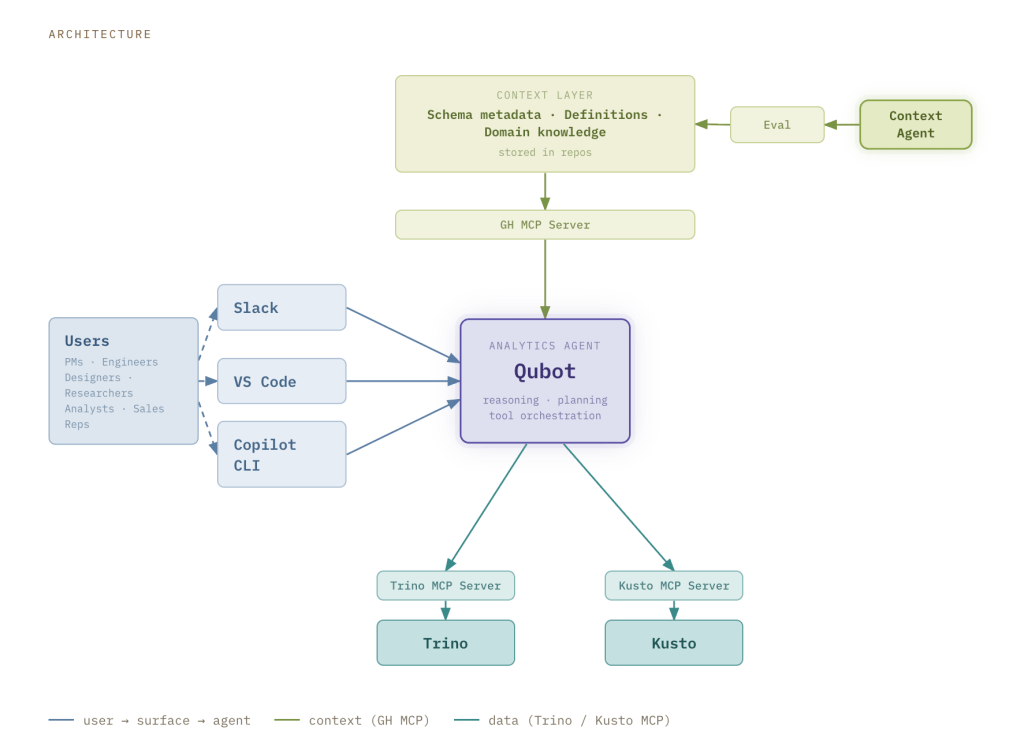 User interface Qubot is accessible through Slack, VS Code, and the Copilot CLI. The Slack interface doesn’t require any configuration, and it is the preferred collaboration tool of Hubbers. When someone posts a question in the Qubot Slack channel, a Qubot instance is spawned as a Copilot Cloud Agent running on github.com. The answer is provided directly in Slack, allowing the user to share the result with others, but also iterate in the thread to evolve or refine the question. All the results are also stored as a markdown report in a pull request that the user can reference to fine tune the query or use it in a dashboard. Qubot is also available in VS Code and the Copilot CLI, for users that want an experience more integrated with their workflows. Qubot can be installed with one command as a plugin, and it becomes available in any agent session in VS Code or Copilot CLI alongside any other custom agents, skills, and tools configured by the user. Context layer Our data warehouse contains data at different stages of curation: raw events (bronze), conformed facts and dimensions (silver), and curated datasets designed for specific business use cases (gold). The context layer is built in a federated way, with knowledge that is tailored to the type of data.
Source: https://github.blog/ai-and-ml/github-co ... ics-agent/
User interface Qubot is accessible through Slack, VS Code, and the Copilot CLI. The Slack interface doesn’t require any configuration, and it is the preferred collaboration tool of Hubbers. When someone posts a question in the Qubot Slack channel, a Qubot instance is spawned as a Copilot Cloud Agent running on github.com. The answer is provided directly in Slack, allowing the user to share the result with others, but also iterate in the thread to evolve or refine the question. All the results are also stored as a markdown report in a pull request that the user can reference to fine tune the query or use it in a dashboard. Qubot is also available in VS Code and the Copilot CLI, for users that want an experience more integrated with their workflows. Qubot can be installed with one command as a plugin, and it becomes available in any agent session in VS Code or Copilot CLI alongside any other custom agents, skills, and tools configured by the user. Context layer Our data warehouse contains data at different stages of curation: raw events (bronze), conformed facts and dimensions (silver), and curated datasets designed for specific business use cases (gold). The context layer is built in a federated way, with knowledge that is tailored to the type of data. - For bronze data, we have telemetry context contributed by product teams, with schema information and metadata.
- For silver data, we have examples of queries, usage guidance, mandatory filters etc, maintained by the data and analytics team.
- For gold data, we have business rules and metric definitions, contributed by teams owning those datasets.
- Test cases: A curated dataset of prompts with known correct answers, ground-truth SQL, and metadata (domain, difficulty).
- Automated run orchestration: A script that automates launching each test case as an agent task with the GitHub CLI gh agent-task create, runs multiple parallel trials, polls for completion, and saves detailed JSON results.
- Stats aggregation: A reporting script that reads the saved results and computes per-test-case metrics: completion rate, accuracy, and duration (avg/min/max).
Source: https://github.blog/ai-and-ml/github-co ... ics-agent/